Home/Features
FeaturesEverything in Medyzo, module by module
No hidden modules, no pay-per-feature pricing. Buy the plan that fits your shop and every capability below is switched on.
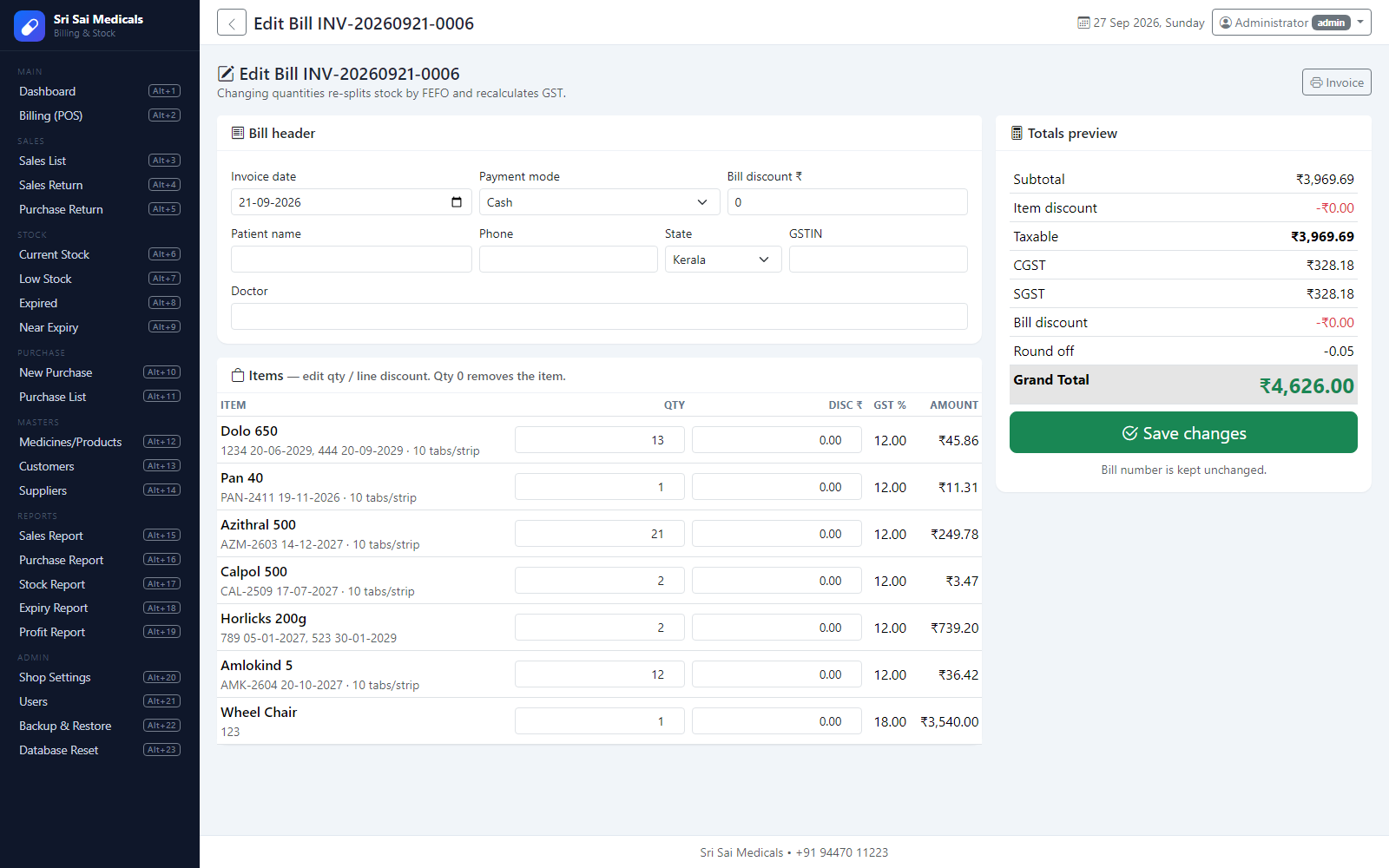
Billing & point of sale
The screen your cashier lives in. Built to be fast, forgiving and hard to get wrong — including on the busiest hour of the day.
- Instant search by brand name, generic name or barcode scan
- Quick quantities with unit handling for strip, box, bottle and piece
- Hold and resume an unfinished bill while a customer is picked up
- Discounts on a single line or on the whole bill, applied before tax
- Tax handling — GST rate per item, printed as CGST/SGST or IGST
- Payment modes — cash, UPI, card and credit, with change calculated for you
- Returns and cancelled bills put the stock back automatically
- Invoice printing on A4 or 80 mm thermal paper, with reprint and full history
- Offline resilience — keep billing if the internet drops
Inventory & expiry control
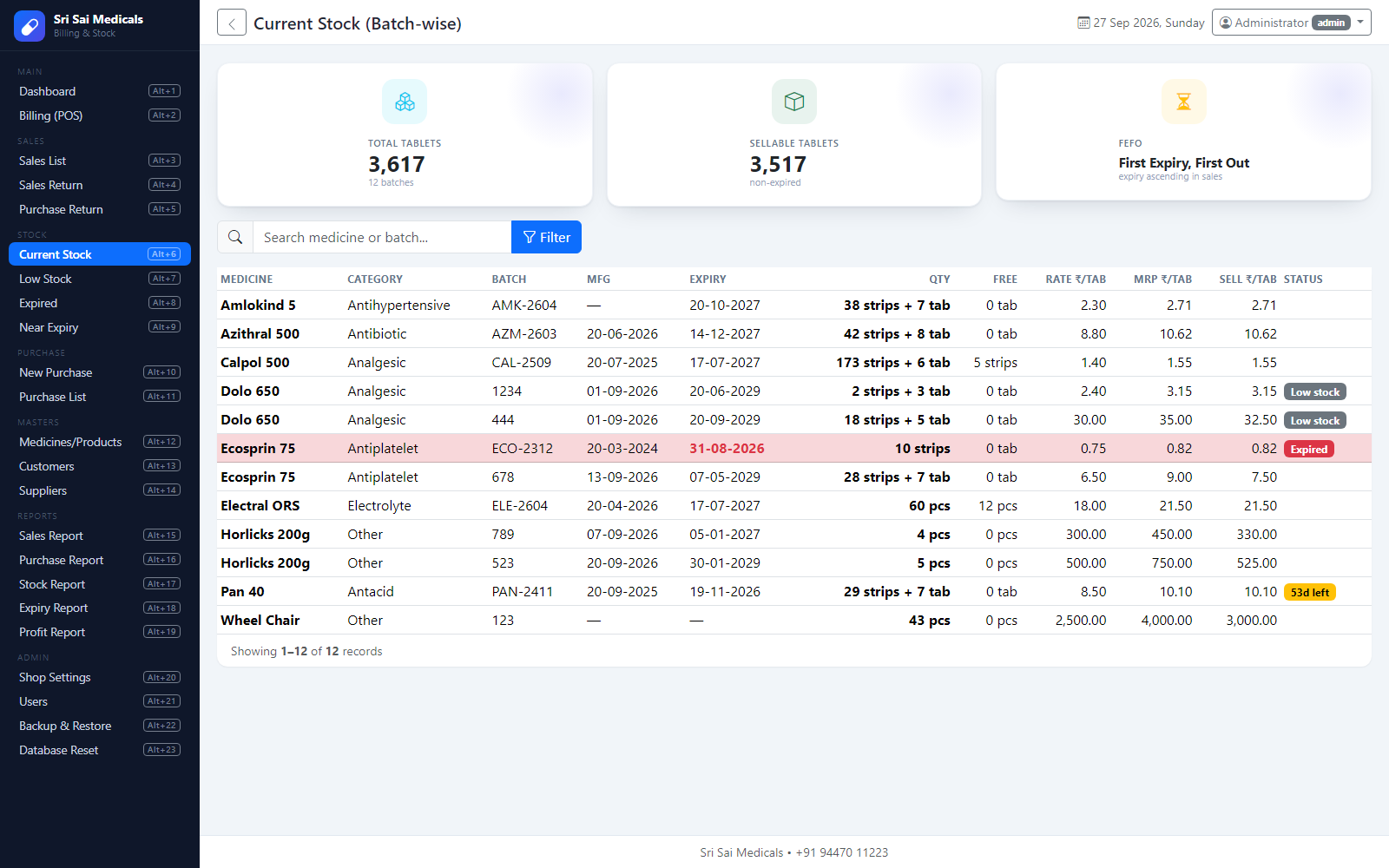
Stock that updates itself. Every movement — purchase, sale or return — updates your stock count for you, so the shelf and the system agree.
- Medicine master with brand, generic, company, category, HSN code and barcode
- Batch numbers with manufacturing and expiry dates per batch
- Multiple purchase and selling prices, with margin shown before you bill
- Low-stock list and a reorder report based on the reorder level you set
- Expiry report for everything expiring inside a window you choose
- Batch-wise stock for every item, with purchase date and expiry date shown
- Stock value from your purchase price, alongside MRP and selling price
- Margin shown before you bill, so you never sell below cost by accident
- Suppliers and customers with outstanding amounts tracked for you
Customers
- Name, mobile, email and address
- Complete purchase history per customer
- Outstanding payment / credit ledger
- Quick add while billing, no extra screen
- Customer-wise sales and loyalty counts
- Exportable customer list
Suppliers & purchases
- Supplier master with contact and address
- Purchase invoice entry with batch and expiry
- Payment and due-date tracking
- Supplier-wise purchase and rate history
- Purchase returns with automatic stock deduction
- Shortage and rate comparison between suppliers
Reports you can actually act on
Every report filters by date and prints cleanly, so you can hand a printout or a PDF to your accountant.
Sales
Day and month totals, sales by hour, by cashier, by payment mode, and invoice-wise listing with returns shown separately.
Profit & margin
Gross and net profit per item and overall, based on purchase versus selling price, so you know which lines actually make money.
Stock
Current stock with value, reorder list, expiring batches and your batch-wise stock position.
Cashier performance
Sales and collection per user, plus discount and return tracking, useful for a multi-counter shop.
Purchases
Purchase volume by supplier and item, payment status of purchase bills, and rate change history.
Expiry & wastage
Value of stock approaching expiry, items already expired, and a wastage summary to review your buying pattern.
Built for a real shop, not a demo
- Role-based logins — owner, manager, cashier, with permission levels
- Cashier logins so you can see who billed, and restrict what each role may change
- Automatic daily backup with one-click restore
- Stock never goes negative silently — every movement is a real transaction
- Invoice numbering and store branding configurable to your requirements
- Keyboard-first billing for high-speed counter work
- Mobile-friendly screens for stock checks on the shelf
- Works on XAMPP, cPanel, VPS and dedicated servers
What you get after purchase
- Your own copy of the software, on your own computer or server, right after payment
- Setup guide plus a screen-share installation call
- Sample medicine list to explore the system safely
- Help entering your existing medicine list, so you are not billing blind on day one
- Free updates, and we help you move to a newer version when one is released
- Email and phone support for setup and usage questions
Not sure which plan you need?
Tell us about your shop — roughly how many medicines you stock and how many people bill at the counter — and we will send a written quote. No obligation.